
HOON+ Custom Tuning
Configure Launch Control, No-Lift Shift, Crackle, and Boost+ with precision using Penta Tuning Studio
HOON+ Custom Tuning is a configurable tuning system inside Penta Tuning Studio. It allows you to adjust supported ECU behaviors using intuitive sliders and generate a corresponding custom tune file based on those settings. All HOON+ adjustments apply only to a single tune file named Hoon+ Custom, located in the Tuning tab. No other tune files are modified.
Quick Start
- Adjust sliders to suit your setup
- Select Save Settings
- Click Generate Tune
- Reflash “Hoon+ Custom” to apply to the ECU
Important
Saving updates only the server-side “Hoon+ Custom” file.
Nothing changes on the ECU until you reflash the updated file from the Tuning tab.
The HOON+ Interface
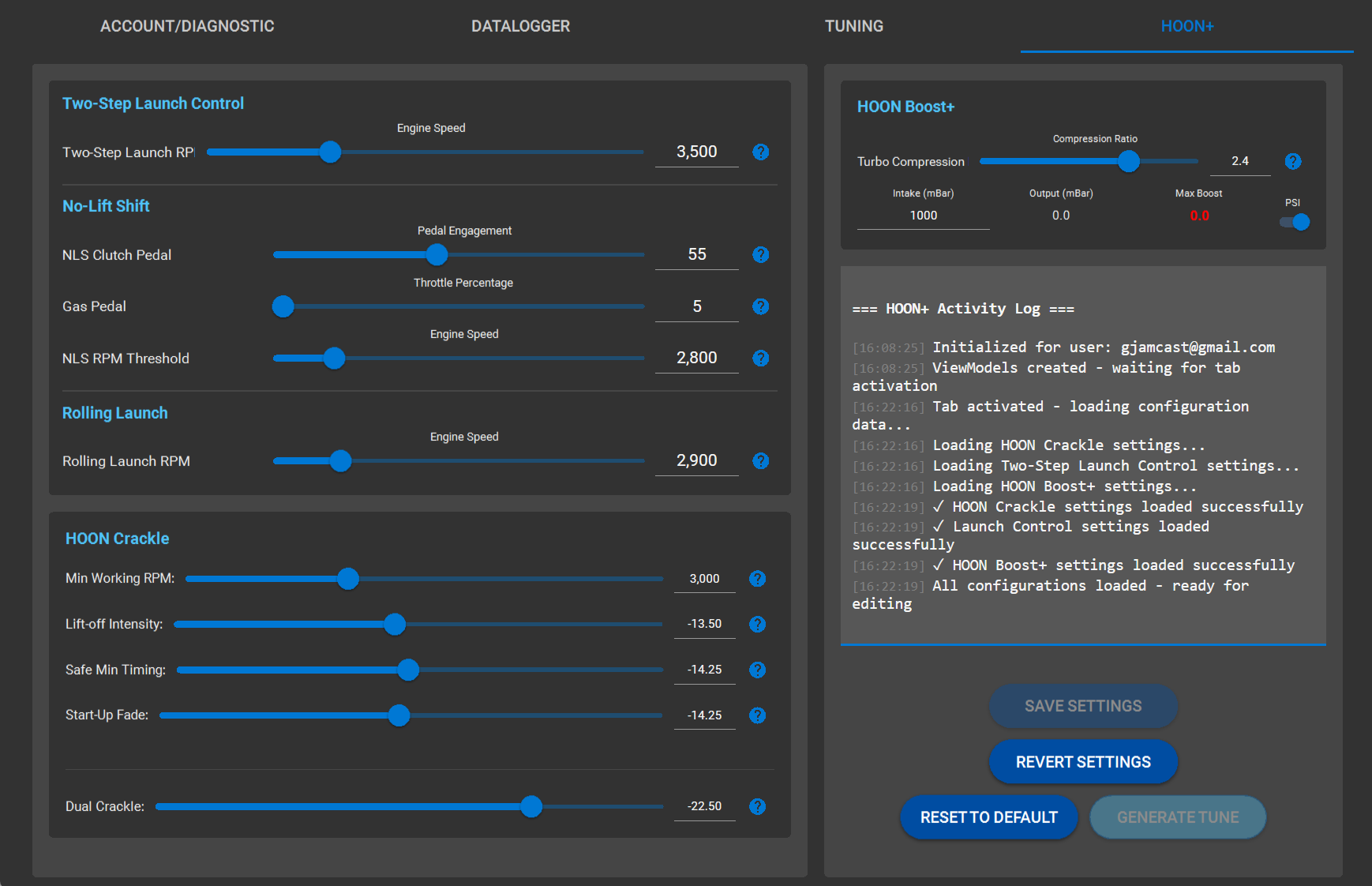
The HOON+ page is where you configure Launch, No-Lift Shift (NLS), Crackle, and Boost+ using grouped sliders. Each slider updates the value shown beside it.
HOON+ Workflow
HOON+ Buttons
Save Settings
Saves your selections to the server-side “Hoon+ Custom” file.
Revert Settings
Cancels unsaved changes and restores the last saved configuration.
Reset to Default
Returns all settings to the baseline factory defaults.
Generate Tune
Builds the tune file using current saved settings.
HOON+ Parameters
Expand each section below for detailed tuning information and recommended settings.
HOON+ Launch Control
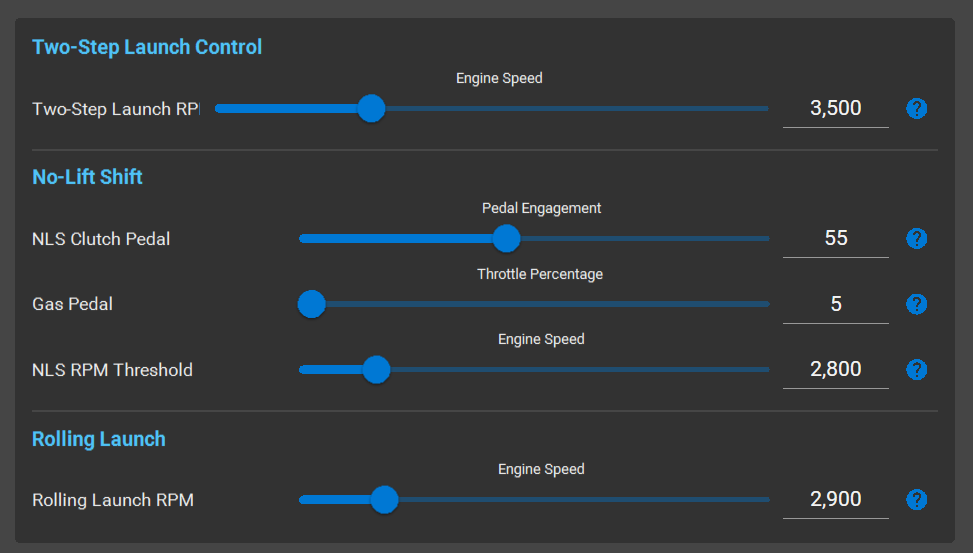
This section controls Two-Step Launch, Rolling Launch, and No-Lift Shift parameters for optimized acceleration.
Two-Step Launch Control
Launch RPM — Sets the RPM target Two-Step Launch will hold while launch mode is active.
Rolling Launch
Rolling Launch RPM — Sets the target RPM for rolling launch control. Set this near the RPM where your setup reaches full boost. To disable, set to max RPM.
How to use:
- Hold the 0 button and floor the throttle
- RPM will be held at the target when engaged
- Wait 2–3 seconds to build boost, then release to launch
Recommended start: 2900 RPM
No-Lift Shift (NLS)
NLS Clutch Pedal Sensitivity — Controls how much clutch pedal movement is required for NLS activation. Each vehicle differs, so use the datalogger to identify the clutch bite region.
NLS Gas Pedal Threshold — Defines the minimum accelerator input required to trigger No-Lift Shift.
- 5–10%: Allows NLS at most throttle positions (recommended for learning)
- 60–70%: Restricts NLS to wide-open throttle only
NLS RPM Threshold — Sets the minimum engine speed required for NLS to activate.
- 2800–3000 RPM: Normal driving
- 4500+ RPM: Aggressive or track use
- 7500 RPM (max): Disables NLS
HOON Crackle
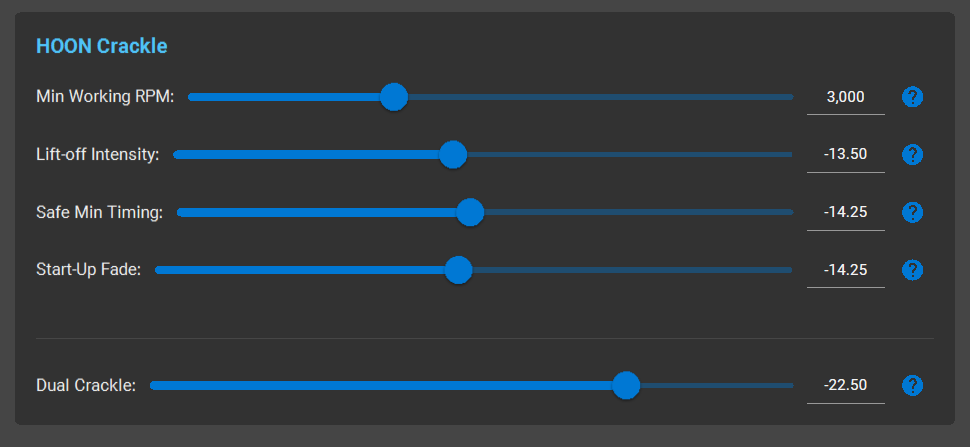
Crackle settings control the operating RPM window, intensity, and timing limits for lift-off and shift crackles. All HOON Crackle sliders adjust ignition timing retard during specific operating conditions.The sliders can be a bit tricky at first, and there’s a bit of a learning curve. We suggest you start with the values shown in the screenshot above and then adjust them gradually—no more than 1.5 degrees at a time. If you’re unsure which sliders to adjust, set them all to the same value and fine-tune them individually later.
Tip: Start with all crackle sliders set to the same as the screenshot or -15 and adjust in increments of 1.5 degrees. More negative = more aggressive sound.
Crackle Timing
Minimum Working RPM — Sets the minimum engine speed where crackle logic is active. Below this threshold, crackle is disabled.
Recommended: 3000 RPM (prevents crackle at idle/low speeds)
Lift-off & Gear-Shift Intensity
Controls the strength of pops and crackles during lift-off and shifts. More retard produces sharper and more aggressive after-shift crackles.
Safe Minimum Timing — The lowest timing the engine will allow during steady operation. Prevents excess heat and protects components.
Start-Up Timing Fade — Manages transition from cold-start spark behavior to normal timing as the engine warms up.
Dual Crackle (Momentary Override)
Dual Crackle is a temporary, more aggressive crackle setting that activates only while you continuously hold the Cruise Control “0” button. Release and it immediately returns to normal.
Common setup:
- Normal crackle: -12 to -15
- Dual Crackle: -25
HOON Boost+
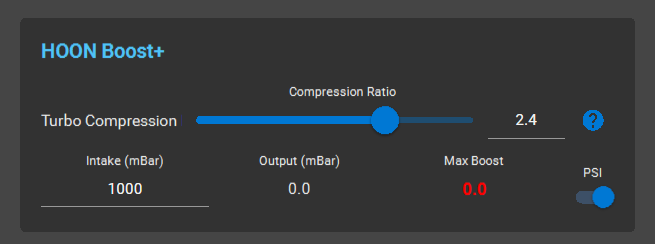
Boost+ allows you to set a lower boost threshold whenever HOON Mode is not enabled. For example, setting it to 14 psi will limit your boost when Cruise Control is NOT ACTIVE. When CC/HOON Mode is active, normal boost levels apply. This is ideal for people sharing their vehicles, or when you simply want a fuel-efficient version of your tune.
Turbo Compression Ratio
Defines the boost target using the turbo inlet-to-outlet pressure ratio. Input your intake ambient pressure—typically around 100 mBar lower than atmospheric pressure.
- Higher values: Increased boost
- Lower values: Reduced boost
Recommendation: Match the existing base tune value, then adjust in small increments. Validate results using boost/pressure logging.
⚠️ Safety Notes
Make changes gradually. After each adjustment, regenerate the tune, flash the ECU, and test. Excessive ignition retard increases exhaust temperature and component wear. If abnormal behavior occurs, revert to a known working Hoon+ Custom configuration using the Revert Settings button.
Using the Sliders
- Drag a slider left/right to adjust
- The number beside the slider shows the current value
- Select Save Settings to store your changes
Activity Log
Use the Activity Log to confirm your configuration has loaded and the page is ready for changes. The log displays connection status and any errors.